Recruitment Tech Stack 2026: Build a Stack That Actually Works
A practical framework for choosing, connecting and auditing ATS, CRM, sourcing, outreach, assessment, automation and analytics tools without overbuying.
Picking the actual sourcing tool is a layer below the framework on this page. The AI sourcing tools shortlist ranks the 10 that tested well in real workflows.
Most recruitment problems look like people problems. They're not. They're stack problems.
Candidates ghosting you. Pipelines that nobody on the team reads the same way. Two recruiters working the same lead without knowing it. Hires that drag on for 47 days when they should close in 18. None of that is a motivation issue. It's friction. And friction lives in your tools, not your team.
This is the independent guide to building a recruiter tech stack that actually works. No "all-in-one platform will solve everything" fairy tales. No affiliate-driven tool lists disguised as advice. Just the framework, the categories, the decision rules, and the mistakes that cost agencies real revenue.
If you only read one thing on SourcrLab, read this one. Then start swapping tools.
What is a recruiter tech stack?
A recruiter tech stack is the connected set of software you use to run hiring end-to-end. From the moment a role opens to the moment a new hire signs.
The word that matters is connected. A stack is not a list. A list is what you get when you buy tools because a competitor has them, or because LinkedIn keeps running ads at you. A stack is what you get when every tool feeds the next, and every data point flows without a human copy-pasting at midnight.
At SourcrLab we think of a stack in eight workflow stages, not five. Because "sourcing" and "screening" aren't single things. They're layers:
- Core Systems: your ATS or recruitment CRM. The system of record.
- Talent Acquisition: sourcing, contact enrichment, market mapping.
- Engagement & Conversion: outreach sequences, email, multi-channel.
- Selection & Evaluation: assessments, interviews, scorecards.
- Automation & Integration: the glue: Zapier, Make, native APIs.
- Analytics & Optimization: time-to-hire, conversion, cost-per-hire.
- Candidate Experience: career sites, branding, status updates.
- Operations: post-hire: contracts, payroll, compliance.
Why your stack decides your hiring outcome
Manual work is one of the hidden costs of a fragmented stack: data entry, tab switching and retyping information that already exists elsewhere. Measure that cost in your own process before buying automation.
Your stack decides three things before any recruiter opens their laptop:
How fast you move. Friction compounds. Small handoffs compound when they happen across every candidate and every recruiter. Time the repeated steps in your own workflow instead of relying on a generic productivity benchmark.
What you see. If your candidate data lives in three systems, you don't have a pipeline. You have three partial pipelines and three partial stories. And those stories always disagree at the worst possible moment, usually in front of the client.
What you can scale. Manual processes become less reliable as candidate volume, collaboration and reporting requirements increase. Most agencies only discover this after they've already hired the ten.
You cannot out-hustle a bad stack. You can only rebuild it. The agencies that scale in 2026 aren't the ones working harder. They're the ones whose systems stopped fighting them.
That's the core thesis of another SourcrLab post worth reading: what actually moves hires. Three levers matter. Seven don't. Stack architecture is one of the three.
The five jobs of a recruitment stack
Forget the eight categories for a moment. Those are where tools live on SourcrLab. Here are the five jobs a stack has to do. Every tool you own should map to exactly one. Every job should have exactly one owner.
Job 1. Find people who aren't looking
Sourcing is not posting jobs. Posting jobs is waiting. Sourcing is actively identifying, enriching, and qualifying people who haven't raised their hand yet.
The best sourcing tools in 2026 don't just scrape LinkedIn. They pull from GitHub, Stack Overflow, open web, conference attendee lists, community platforms, and niche job boards. Coverage matters more than cleverness. If your pipeline depends on one channel, you don't have a pipeline. You have a dependency that will eventually fail.
Two deeper reads if this is your weak spot:
- How to build a complete LinkedIn sourcing workflow. Where 87% of recruiters still start, done properly.
- 7 proven sourcing strategies for hard-to-fill roles. Boolean, X-ray, communities, AI.
Job 2. Reach them
Sourcing gives you a name. Data enrichment gives you a way to actually contact them.
This is the layer most recruiters skip and then blame "candidate quality" for their low response rates. The candidate is fine. You just don't have their email. Or worse. You have an email from 2019 that bounces and poisons your sender reputation.
Clean contact data changes reply rates more than any cleverness in your outreach copy. Seven tools that actually deliver verified contact info are broken down here: best data enrichment tools for recruiters in 2026.
Job 3. Keep everyone straight
Your ATS or CRM is the single source of truth. Not your inbox. Not your head. Not a shared Google Sheet that your colleague keeps breaking with a stray pivot table.
The ATS vs CRM distinction trips up almost everyone. Short version: an ATS is built around jobs. Candidates flow through pipeline stages per requisition. A CRM is built around people. Relationships maintained over time, independent of any specific role. Agencies need both (or a hybrid). In-house teams usually only need the ATS.
Long version: ATS vs CRM. Which one do you actually need in 2026.
Overbuying happens heavily at this layer. A solo recruiter does not need Greenhouse. A 200-person enterprise TA team does not need a $29/month Notion template. Match the tool to the complexity you actually have, not the complexity you imagine having in eighteen months.
When you're ready to compare the real players: our Best ATS picks for 2026 has editorial rankings with declared winners. And if you're torn between two specific CRMs, Manatal vs Recruit CRM is the head-to-head most agencies actually need.
Job 4. Make them reply
This is where most stacks silently fail. You can source the perfect candidate, enrich their contact info, log them in a pristine CRM. And still lose them because your outreach looks like every other recruiter's outreach. Because it is.
Engagement tools earn their keep by:
- Letting you personalize at scale without sounding templated
- Sequencing follow-ups so the second and third touches actually happen
- Running across multiple channels (email + LinkedIn + SMS) without duplicate work
- Telling you what's working. Reply rate by sequence, by persona, by hiring manager
Job 5. Pick the right ones
Screening is where bias and bad data do the most damage. Most teams are underpowered here. They spend heavily on sourcing, then make the final decision on vibes.
A proper selection layer has three parts:
- Structured assessments that test what the job actually requires, not IQ-shaped proxies
- Structured interviews with scorecards every interviewer fills in the same way
- A place to compare candidates side by side that isn't somebody's memory
Scheduling is the other quiet killer of selection processes. A good interview scheduling tool can remove meaningful coordination work from a busy recruiting team. We compared two of the biggest: Calendly vs GoodTime.
Job 6. Learn from what happened
Yes, this is the sixth job in a framework I called "five jobs". Because nobody counts analytics and then everyone regrets it.
If you can't tell me your time-to-hire by role type and your conversion rate from first reply to first interview, you're running a recruitment business blind. Analytics doesn't require a BI team and a Tableau license. Most modern ATSs ship with dashboards that cover 80% of what agencies and in-house teams need. Use them. Review them weekly. Kill the channels that don't convert.
The fastest fix most teams can make here: stop measuring vanity metrics (number of candidates sourced) and start measuring quality metrics (reply rate, interview-to-offer conversion, offer acceptance rate, 90-day retention). ---
The stack visualized
Here's what a connected stack actually looks like. And where data flows between the jobs:
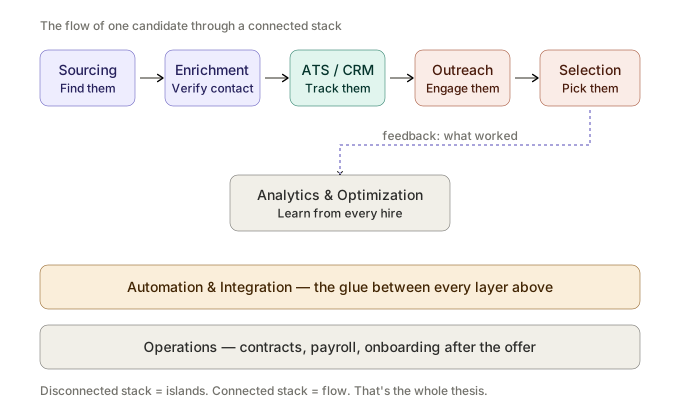
The arrows matter more than the boxes. A stack where data flows automatically between sourcing, CRM/ATS, outreach, selection and analytics reduces handoffs and makes the workflow easier to measure.
How to build a stack without overbuying
The biggest mistake in recruitment tech is not under-tooling. It's over-tooling. Teams stack logo after logo on a diagram and call it a strategy. Then they wonder why nothing talks to anything.
A simple rule that works across team sizes: 1 Core + 2 Enablers.
Pick one tool that owns each job. Pick two enablers around it that solve specific, measurable bottlenecks. That's the whole stack at the starter level. You expand only when a new job appears that the existing stack genuinely cannot do. Not when a vendor demo makes you feel inadequate.
The five-step build sequence
- Map your current process. Candidate journey, end to end. Put it on paper.
- Mark bottlenecks in red. Where do things slow down, get dropped, or get duplicated?
- Pick the tool that kills the biggest red mark. One tool. Not three.
- Integrate before you add. Every new tool must connect to the one before it and the one after it, or it doesn't enter the stack.
- Measure the delta after 30 days. If the bottleneck is still red, the tool was wrong. Remove it without guilt.
Shortcut: if you want this structured, the SourcrLab Stack Audit does it in 60 seconds. Four questions, top 3 tool picks, no email required.
The right stack depends on where you are
"Best stack" is a meaningless phrase without context. Here's what actually matches, by team shape.
Solo recruiter or boutique agency (1–3 people)
Speed and simplicity beat everything else. You need to place people, not admin people.
- Core: A lightweight ATS/CRM combo. Recruit CRM, Loxo, or Recruiterflow are the usual suspects.
- Sourcing: One Chrome extension that handles contact enrichment. That's it.
- Outreach: A sequencer that doesn't need an ops team to run (Reply, Lemlist, or built into your CRM).
- Everything else: Don't buy it yet.
Growing agency (4–15 recruiters)
Visibility becomes the problem. You have enough people that they start stepping on each other's leads.
- Core: A proper recruitment CRM with multi-user permissioning and deal-stage visibility.
- Sourcing: Consider a dedicated sourcing platform (hireEZ, SeekOut) in addition to your Chrome extension layer.
- Engagement: Multi-channel outreach with reporting. Single-channel email isn't enough anymore.
- Automation: This is where you add Zapier or Make. Not before.
- Analytics: Whatever your CRM ships with. Review weekly in a 30-minute team call.
In-house TA team (mid-market to enterprise)
Now compliance, integrations, and stakeholder reporting matter as much as finding candidates.
- Core: A structured-hiring ATS (Greenhouse, Ashby, Lever). Non-negotiable.
- Sourcing: Enterprise sourcing platform with GDPR-clean workflows.
- Selection: Structured interview tooling + assessment platform with audit trails.
- Candidate experience: A proper career site + branded candidate portal.
- Analytics: Integrated into your BI stack, not a recruiter-only dashboard.
- Operations: Integrate with HRIS/payroll before someone gets hired, not after.
Red flags in recruitment tech (what vendors won't tell you)
Most guides stop at "here are categories and tools." Here's what a decade of watching agencies buy and regret software looks like. The full version. With the seven specific patterns that burn budget fastest. Is the most-read post on SourcrLab: 7 tooling mistakes killing your recruitment stack in 2026. Read it after this.
The short version:
- "All-in-one" usually means "mediocre at everything." A real all-in-one exists in the solo segment. Above that, best-of-breed + good integrations wins.
- Free trials requiring a sales call are not free trials. They're filtered demos. Prefer tools with self-serve trials.
- "AI-powered" on a landing page means nothing. Ask what model, what training data, what measurable outcome improves. If the answer is vague, the AI is vague. Our AI recruitment tools guide separates the real from the repainted.
- Annual contracts locked before you've run the tool for 30 days. Walk away. Any vendor confident in their product will let you prove it monthly first.
- Data export is never free, never easy. Always check how you get your data out before you put it in. Vendor lock-in on candidate data is the single most expensive mistake in this industry.
- "Integrates with your ATS" often means "has a Zapier connector." Not the same as a native integration. Ask for the specific integration spec before you buy.
- Feature count is not feature quality. A tool with 200 features and a bad UX will lose every time to one with 20 features your team actually uses.
How to compare tools without wasting a month
Buying recruitment software is not a research problem. It's a decision problem. Most teams confuse the two and spend three months "evaluating" their way into a worse decision than a week of honest testing would have produced.
A four-question framework that cuts the time in half:
- What's the one job this tool has to do? Can't name it in a sentence? Not ready to buy.
- What's the next-best alternative, and why is this one better? Don't know the runner-up? Don't know the winner.
- What breaks in my workflow if I remove this tool in six months? If the answer is "nothing," you don't need it.
- Who on my team owns this tool? Every tool needs one human accountable for its output. No owner = no adoption = wasted spend.
Building a more inclusive stack
One layer worth calling out separately because most stacks neglect it: diverse pipeline tooling.
Diversity hiring doesn't happen because you want it to. It happens because your stack is structured to remove bias at the points where bias enters. Sourcing queries, screening criteria, interview evaluation, offer negotiation. Tools exist for each of these. Most teams own none of them.
---
The 2026 shifts that actually matter
Ignore the AI hype cycle. Here are the shifts changing real stacks this year.
Modular beats monolithic. The market is moving away from "one platform for everything" toward best-of-breed tools connected by APIs. Your stack should be replaceable at each layer. Vendors selling you a closed ecosystem in 2026 are selling you 2019.
AI copilots sit on top of the stack, not inside individual tools. The winners are ones that read across your CRM, email, calendar, and docs. Not the ones bolted onto one vendor's UI. If your "AI feature" only knows what's in its own database, it's not an AI copilot. It's a search bar with marketing.
Data ethics is now a buying criterion. Candidates are paying attention. GDPR, DSGVO, and equivalents in APAC are tightening. Tools without clean audit trails are becoming liabilities, not assets. Expect a compliance question on every vendor demo from 2026 onward.
Integrations are the moat. Tools with rich, native integrations outlast tools with better features but worse plumbing. Every single time. If a vendor's integration docs are thin, their product will be thin in 18 months too.
The SourcrLab answer
Here's where most guides end with "and our tool does all of this." This one doesn't.
SourcrLab is a comparison platform, not a tool. We don't sell an ATS. We don't sell a CRM. We're editorially independent. Rankings can't be bought, affiliate links are marked. If a tool is the right pick, we'll tell you even when it costs us. If it isn't, we'll tell you that too.
Three ways to actually use this guide:
- Don't know where to start? Run a 60-second stack audit. Four questions. Top 3 picks. No email required.
- Comparing two specific tools? Browse 500+ comparisons. Each has a winner and a "pick the other one if. " rule.
- Already have a stack and want to know what's broken? Build your current stack and see gaps, redundancies, and underperformers in five minutes.
Last reviewed: 23 August 2026. Product capabilities and pricing can change; verify material buying details on the vendor's current documentation before signing a contract.
SourcrLab decision rule
every tool needs one clear job, one owner and one measurable outcome. If two products do the same job, the overlap must be intentional and justified by evidence from your own workflow.
How to read this article
This article combines SourcrLab's recruitment-technology taxonomy, operational recruitment experience and public product information. A recommendation is a fit judgement, not a claim that one product is universally best. Commercial relationships do not determine inclusion or editorial conclusions. Read the methodology.
Use the Stack Audit, browse Core Systems or read the tooling mistakes audit.
Frequently Asked Questions
What is a recruiter tech stack?
A recruiter tech stack is the connected set of software used to run a hiring process end-to-end. Typically covering an ATS or CRM, sourcing tools, engagement and outreach platforms, assessment tools, automation glue, and analytics. The emphasis is on connected: a stack is not a list of tools, it's a system where data flows between each layer without manual copy-paste.
How many tools should be in a recruiter tech stack?
Fewer than you think. There is no ideal tool count. The right number is the smallest set that covers the required jobs without creating unmanaged overlap or broken data flows.
What's the difference between an ATS and a recruitment CRM?
An ATS (Applicant Tracking System) is built around jobs. Candidates flow through pipeline stages per open requisition. A CRM is built around people. Relationships and touchpoints maintained over time, independent of any specific role. Agencies typically need both (or a hybrid), because the same candidate shows up for multiple roles over multiple years. In-house teams usually only need the ATS. Full breakdown: ATS vs CRM. Which one do you actually need.
How much should a recruiter tech stack cost?
There is no reliable universal monthly benchmark. Compare total cost against hiring volume, process complexity, adoption, integrations and measurable outcomes.
Is an all-in-one recruitment platform better than best-of-breed?
Depends on size. Solo and very small teams benefit from all-in-one because integration cost outweighs feature gaps. Above 10–15 recruiters, best-of-breed connected by strong APIs nearly always wins. You get better tools at each layer and replaceable components if any one vendor stagnates.
How do I know if my recruitment stack is broken?
Five signals: recruiters spend more than 30% of time on data entry, pipeline data lives in multiple places, reply rates on outreach sit under 1%, time-to-hire creeps up quarter over quarter, and nobody on the team can agree on what counts as "an active candidate." If two or more of those are true, rebuild. Don't patch.
What's the fastest way to improve a recruiter tech stack?
Fix the integrations before adding new tools. 80% of perceived stack problems are actually data-flow problems between tools you already own. Map your candidate journey, find every manual copy-paste step, kill the three biggest ones with native integrations or Zapier. You'll free up more recruiter time than any new tool purchase will.
Do I need AI recruitment tools in 2026?
Probably, but not the ones being marketed hardest. AI adds real value for contact enrichment, outreach personalization at scale, and interview note summarization. It adds questionable value for candidate "scoring" based on opaque models. Full breakdown of what's real vs what's repainted: AI recruitment tools 2026.
Last updated: April 2026. We update this guide quarterly as tools evolve and new categories emerge. Bookmark it.
SourcrLab catalogue snapshot
Catalogue data, 11 October 2026. SourcrLab currently contains 423 published recruitment-technology profiles across 9 categories. In the stored research dataset, 423 profiles contain at least one pricing signal, 76 have a recorded free trial, 115 have a recorded free plan, 178 contain a source URL, 423 have a recorded verification date and 1 currently contain a structured integration count.
These figures describe the current SourcrLab catalogue, not the entire recruitment-technology market and not vendor market share. They are included to make the framework auditable and will change as profiles are researched and updated. See how SourcrLab researches tools.
Google Preferred Sources
Find trusted recruitment-tech research faster
Add SourcrLab as one of your preferred sources in Google, so our comparisons, guides and research are easier to spot when you search — in AI Overviews, AI Mode and Top Stories. You confirm it in Google, no account details are shared with us, and you can change your sources there at any time.
Add SourcrLab in GoogleRelated Articles
Working with the Blue Devil in 2026
LinkedIn is the only platform where you pay for access to candidates everyone else already sees, through a system that deliberately creates friction so they can sell you more tools to solve it.
Apr 20, 2026
Recruitment Tech Stack Audit: 7 Costly Mistakes to Avoid in 2026
Audit your recruitment tech stack for overlap, weak integrations, poor adoption and wasted spend. Seven practical mistakes, a 25-point scorecard and a European buying lens.
Apr 17, 2026
What Actually Moves Hires in 2026: Pipeline Quality, Conversion & Cycle Speed
A recruiter-led framework for diagnosing hiring performance through three levers: qualified pipeline, stage conversion and cycle speed. Tooling is an enabler, not the metric.
Apr 17, 2026